
WordPress hacked? Then the first hour decides how much damage you end up with. Most owners lose time in the wrong places: they delete files in a panic, change one password and hope for the best, or restore a backup that already contains the hack. This guide walks through the signs of a hacked website, what to do in the first hour, how to keep it from happening again and when to call someone in.
How to tell your WordPress site has been hacked
A hack is not always visible. WordPress.org lists the indicators of compromise that point to a real problem: a site blacklisted by Google or Bing, a host that has disabled your website, a site flagged for distributing malware, visitors whose antivirus warns them, and activity you did not authorise, such as new users. Sometimes you simply see the damage when you open the site.
Signs you can check yourself in five minutes
Log in and open the user list: is there an administrator you do not know? In June 2026 the Dutch National Cyber Security Centre warned that a botnet was abusing WordPress sites with stolen logins, and named admin accounts starting with wp-maintenance- or wp-backup- as a sign of infection. Open your site on a phone with mobile data, because some malware only redirects visitors who arrive from Google or from a mobile device. Search Google for your own domain and look for pages you never made, often in another language or about products you do not sell. Check whether your host has sent you a warning, and whether your contact form or mail suddenly behaves differently.
Why it usually starts with a plugin
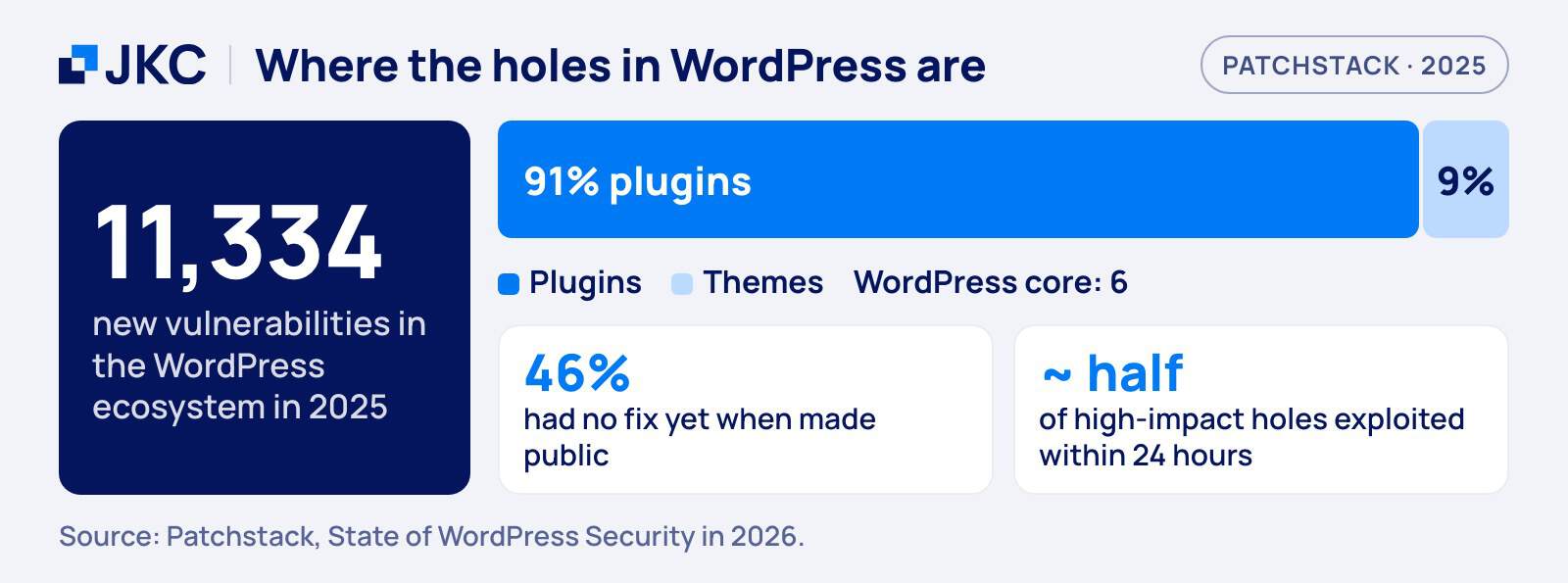
Attackers go where the holes are. The Patchstack report counted 11,334 new vulnerabilities in the WordPress ecosystem in 2025. Of those, 91 percent were in plugins and 9 percent in themes, and only six were in WordPress core. For many of them there was no fix yet: 46 percent had no patch from the developer when they were made public. So the question is rarely whether WordPress is safe, but which plugin on your site is outdated or abandoned.
Of the 11,334 new WordPress vulnerabilities found in 2025, 91 percent were in plugins. Your plugin list is your attack surface.
WordPress hacked: what to do in the first hour
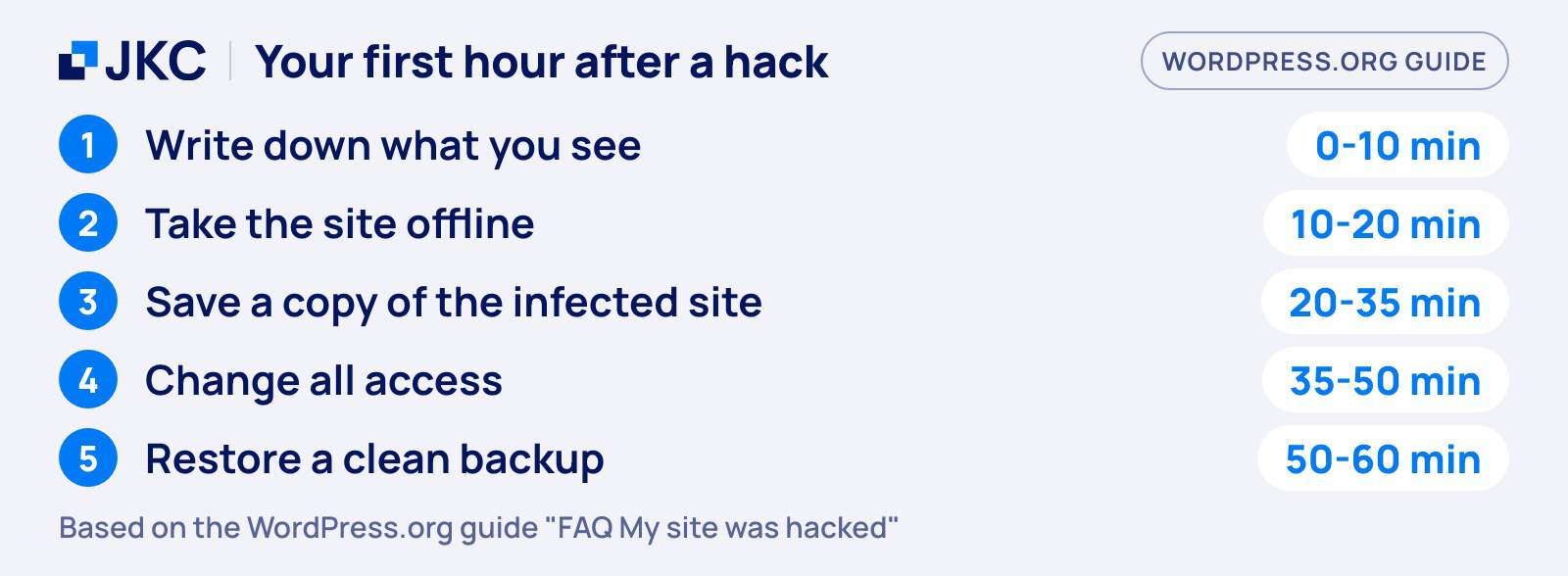
Work in this order. The order matters, because each step protects the evidence and the options for the next one.
Minutes 0 to 10: stay calm and write things down
WordPress.org starts its guide with the same advice: stay calm and document. Write down what you see, at what time you noticed it and what changed recently, such as a new plugin, a theme edit or a new user. This becomes your incident report, whether you clean the site yourself or hand it to someone else. Do not delete anything yet. Deleting files before you know what happened destroys the trail that shows how the attacker got in.
Minutes 10 to 20: take the site out of public view
Put the site in maintenance mode, or ask your host to block public access. This stops visitors from landing on a redirect or malware, and it stops the attacker from using your site while you work. If the site sends spam or attacks other sites, your host may already have suspended it. That is annoying, but it also gives you time. Tell your host what you found, because on shared hosting other sites on the same server can be affected too.
Minutes 20 to 35: save a copy of the infected site
Before you clean anything, take one more snapshot of the files and the database. WordPress.org advises this as well: even an infected copy is a reference if the cleanup goes wrong. Store it away from the server. Then check the backups you already have and note which is the most recent one from before the first sign. You need that date in a few minutes.
Minutes 35 to 50: lock the doors
Change every access point, not just the WordPress login: all WordPress users (administrators first), the hosting panel, FTP or SFTP, and the database. WordPress.org also tells you to replace the secret keys in wp-config.php, which logs out everyone who is still signed in. Do this from a computer you trust. The same guide notes that in many cases the attack starts on the owner’s own machine, so run a full malware scan on your laptop as well.
Minutes 50 to 60: decide between cleaning and restoring
You now have two routes. If you have a clean backup from before the first sign, restoring it is usually the fastest and safest route. If you do not, you have to find and remove the infection by hand. WordPress.org suggests replacing wp-admin and wp-includes with a fresh copy of the same version, uploaded over SFTP, because the built-in reinstall only overwrites files and hacks often add new ones. It also points at .htaccess, index.php, header.php and footer.php as the files attackers change most often.
After the restore: update, then change the passwords again
A restored site is only clean if the hole is closed. Update WordPress core, every plugin and your theme, and remove what you no longer use. WordPress.org adds a step that people skip: change the passwords again after you know the site is clean, in case an attacker still held a copy of the first ones. Our post on what to check before updating to WordPress 7 shows how to update without breaking the site.
WordPress hacked? Signs and your first step
| Sign | First move |
|---|---|
| Unknown administrator | Remove it, reset all logins |
| Strange redirects | Check .htaccess and plugins |
| Host suspended the site | Ask the host for details |
| Spam pages in Google | Scan files, then clean |
| Admin login fails | Reset it via the database |
The WordPress.org guide describes resetting a hijacked administrator through the database, for example with phpMyAdmin, when you can no longer log in.
Securing WordPress: how to prevent another hack
Cleaning up is the expensive route. These habits make the next hack much less likely, and they cost far less than one cleanup. If you want the policy and compliance side of this, such as ISO 27001 and what your clients ask of you, read our post on WordPress security and information security. This post stays with the practice.
Update quickly and remove what you do not use
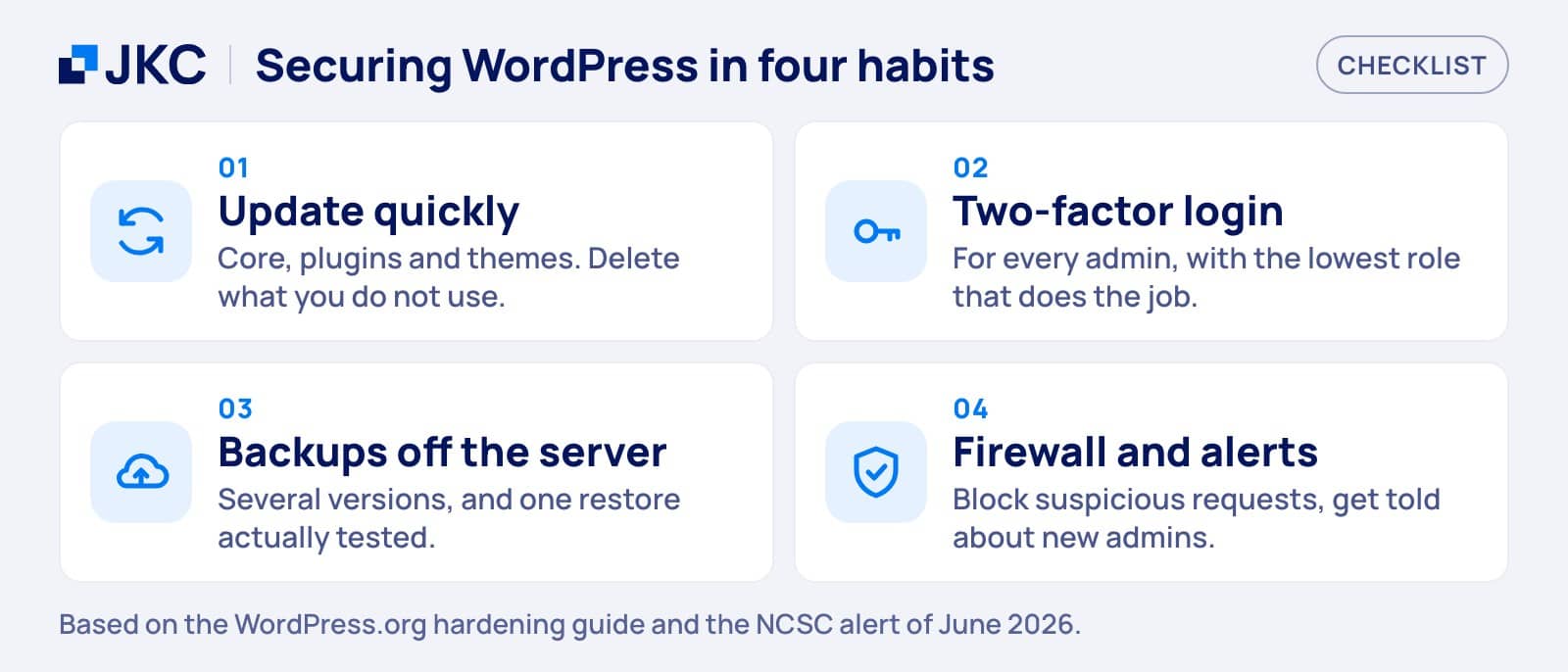
Patchstack found that approximately half of the high-impact vulnerabilities were exploited within 24 hours. That leaves no room for updating once a quarter. Turn on automatic updates for plugins you trust, test the bigger ones on a copy first, and delete plugins and themes you do not use. A deactivated plugin that is still installed can still contain a hole. WordPress.org says the same about core: older versions are not maintained with security updates.
Use two-factor login and give people only what they need
WordPress.org recommends two-step authentication as an extra measure, and it should be switched on for every administrator. Give each person the lowest role that still lets them do their job: an editor does not need to be an administrator, and an agency that left last year does not need an account at all. You can also disable file editing from the dashboard with a single line in wp-config.php. WordPress.org notes that this does not stop an attacker who can upload files, so it is one layer and not the whole plan.
Keep backups away from the server
WordPress.org tells you to back up regularly, including the database. Add two things: store at least one copy somewhere other than the server that runs the site, and test a restore once. A backup you have never restored is a hope, not a plan. Keep several versions, because you may only notice a hack after your newest backups already contain it.
Put a firewall in front of the site
A web application firewall filters known attack patterns before they reach WordPress. It does not replace updates, but it buys you time while a patch is on its way, which matters when nearly half of new vulnerabilities have no fix at disclosure. Combine it with monitoring that tells you when files change or an unknown user appears, so you hear about a problem from your own system and not from a customer.
When to call in help
Has your website been hacked and you cannot sort it out yourself? You can handle a simple infection yourself if you have a clean backup and the time. Call in a professional when you cannot find the source, when the hack comes back after a restore, when the site holds customer data or takes orders, or when you simply cannot afford to be offline for days. If personal data may have been exposed, also check whether you have to report a data breach. Bring your notes from the first ten minutes: they save the specialist hours.
How JKC Media helps with this
We maintain and harden WordPress sites for clients, with updates, backups kept off the server, access control and monitoring. In August 2026 we also cleaned up hacked sites and brought them back online. If you want someone to take this off your hands before something breaks, take a look at our support and maintenance. If your site is hacked right now, contact us and tell us what you see.
Frequently asked questions: WordPress hacked
WordPress hacked: what should I do first?
Stay calm and write down what you see and when you noticed it. Then take the site offline with maintenance mode or through your host, and save a copy of the infected files and database. Do not delete anything yet. After that, change every password and decide whether to restore a clean backup or clean the site by hand.
Can I fix a hacked WordPress site myself?
Yes, if you have a clean backup from before the hack and some technical comfort. Restore it, update everything and change all passwords. If you have no clean backup, the hack returns after a restore, or the site holds customer data or takes orders, hire a specialist. A half-cleaned site can be infected again.
How did my WordPress site get hacked?
Most often through a vulnerable plugin. Patchstack counted 11,334 new WordPress vulnerabilities in 2025, and 91 percent were in plugins. Stolen or weak passwords, an infected computer and old user accounts are the other usual causes. Finding the exact route needs forensic work, which is why saving a copy and your notes first matters.
How do I keep my WordPress site from being hacked again?
Update core, plugins and themes quickly and remove what you do not use. Switch on two-factor login, give users only the role they need and keep backups away from the server, with a restore tested once. A firewall and monitoring add a layer. No single measure is enough, so use them together.
WordPress hacked, or want to be sure it never happens? Read about our WordPress support and maintenance or get in touch, and we will look at it with you.
More articles
- Optimise your webshop for Q4 8 October 2026
- WordPress 7: what is new and what to check 29 September 2026
- Core Web Vitals explained: what LCP, INP and CLS mean for your website 23 September 2026