
Why might Google Analytics be banned?
That warning comes from the Dutch Data Protection Authority (Autoriteit Persoonsgegevens, AP). Following an investigation by the Austrian privacy regulator DSB, the Dutch DPA has opened an investigation into Google Analytics in our country. The Austrian regulator warned that the Google service conflicts with the European privacy law, the GDPR.
The General Data Protection Regulation (GDPR) has been in force since May 25, 2018. That means the same rules on privacy rights, the responsibilities of companies within them and the powers of European privacy regulators apply across the entire European Union. This law gives you as a citizen more rights when it comes to privacy and makes sure organizations handle your (digital) personal data more carefully.
The Datenschutzbehörde (DSB) in Vienna ruled that Google Analytics passes on IP addresses and cookie data of users in Europe to servers in the United States. And that is not allowed under the GDPR.
Can I still use Google Analytics?
The Dutch DPA is currently investigating two complaints regarding Analytics in the Netherlands. Once that is complete, the DPA will determine whether the service is allowed or not. So for now you can still use Google Analytics as usual. If the ruling turns out to be that the service is not currently GDPR-proof, that does not immediately mean the end of Analytics. The service can adjust its system so that it does comply with the European privacy law. That is what happened when Google software for education came under fire.
How do I make Google Analytics GDPR-proof?
The investigation is still in full swing, but the Dutch DPA has already shared a guide for setting up Google Analytics in a privacy-friendly way. The problem lies with the cookies Analytics uses. When you use the system to collect data about your website or webshop, you process users’ personal data with analytical cookies. To handle your users’ data in a privacy-friendly way, it is smart to ask for consent. Not doing that yet? Then log in to your Analytics account and follow these 6 steps. That way your users’ privacy is properly arranged and you comply with the GDPR.
- Sign a data processing agreement with Google This agreement states that Google is only a processor of website visitors’ personal data, and so not a controller, for example. Go to the account settings under Admin to request this agreement. Accept the updated amendment and save it.
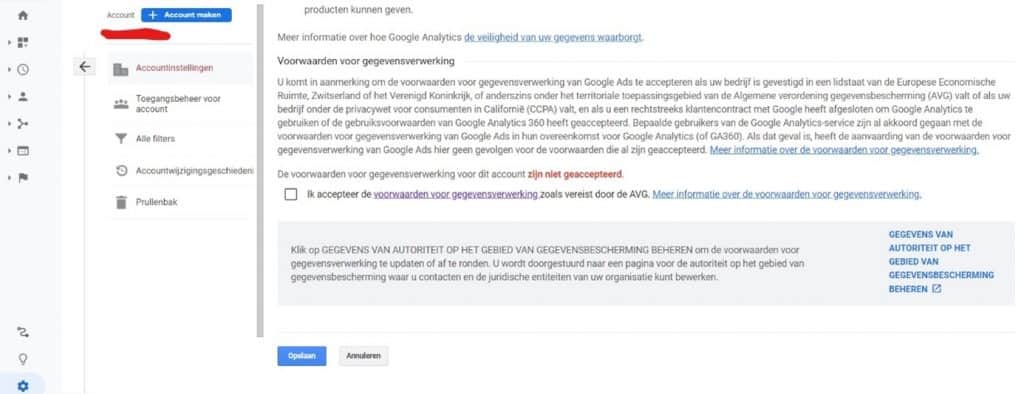
- Do not let Google process the full IP address (anonymize IP)
An IP address identifies a device on the internet or on a local network. Every IP address is unique. Such an address consists of a long series of numbers. Through Google you can remove the last four digits of that address, so that visitors are more anonymous. The Dutch DPA would like those last digits removed in order to reduce the privacy risks for users.How do you do that? Go to Property settings, Tracking info and choose the Tracking code option. There you will see a piece of code that you had to place in the header of your website to connect Analytics. Add the part highlighted in yellow to that code:
 To be safe, keep a screenshot of the date and time when you add the line. If anyone ever asks, you can quickly show when you applied this measure.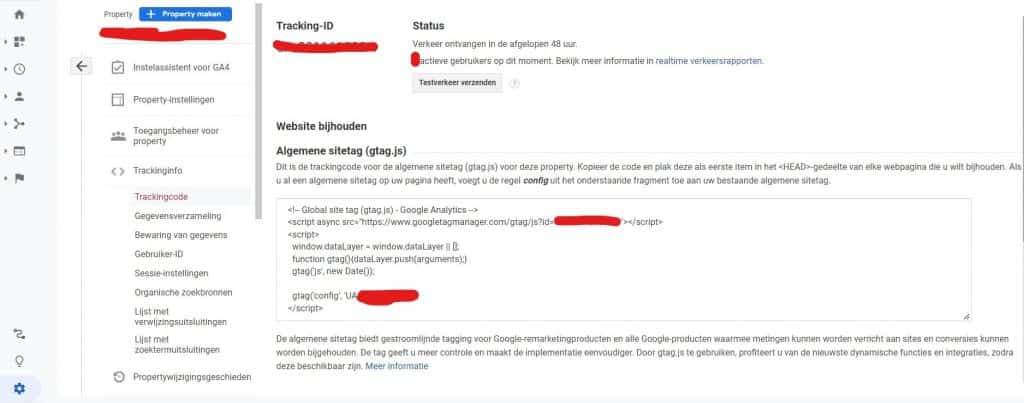
- Turn off data sharing with Google By default, Analytics is set to share data with Google for five different purposes, such as benchmarking and technical support. That way Google acts not only as a processor but also as a controller. And that is not what you want, because then you have to ask visitors for consent on Google’s behalf. Go to the account settings and uncheck the five boxes.
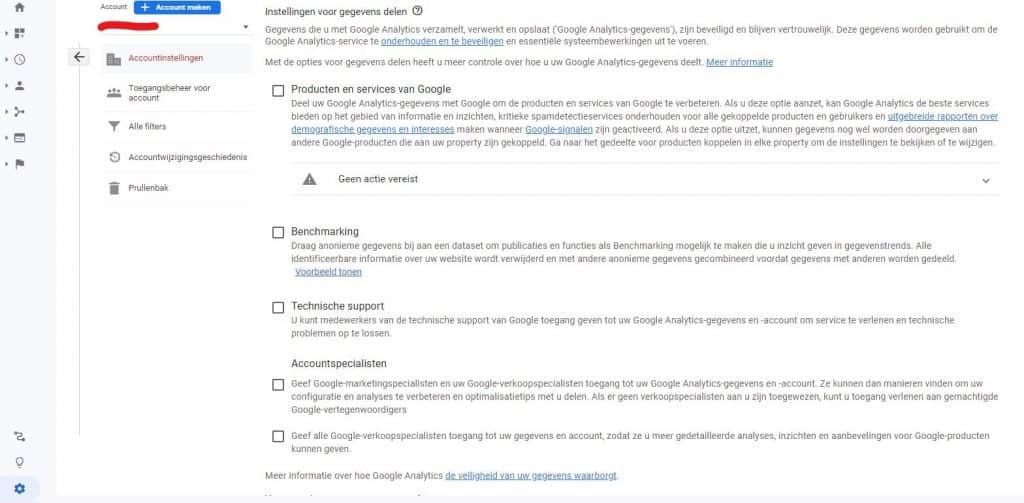
- Turn off data sharing with Google for advertising purposes
Once you have completed step 3, you are not done yet. Google can still use your website visitors’ data: for advertising purposes. You switch that off somewhere else. Go to Property settings, Tracking info and the Data collection option. You will now see the options Remarketing and Advertising reporting features. Switch both off and save.
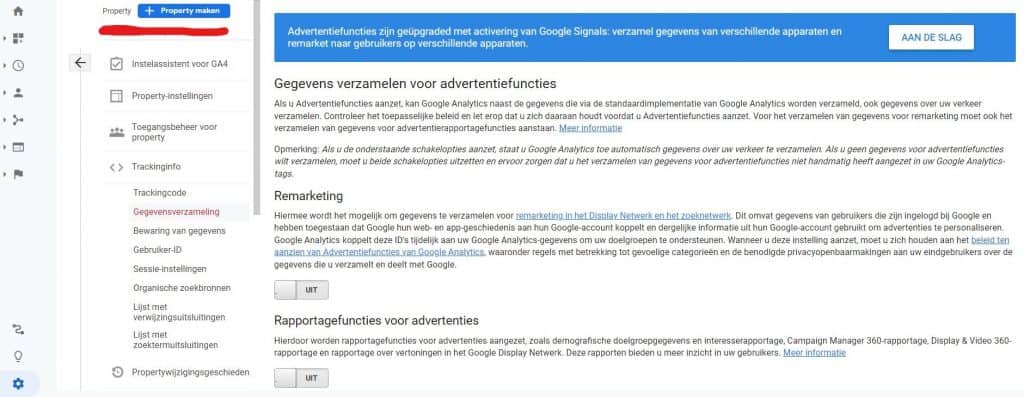
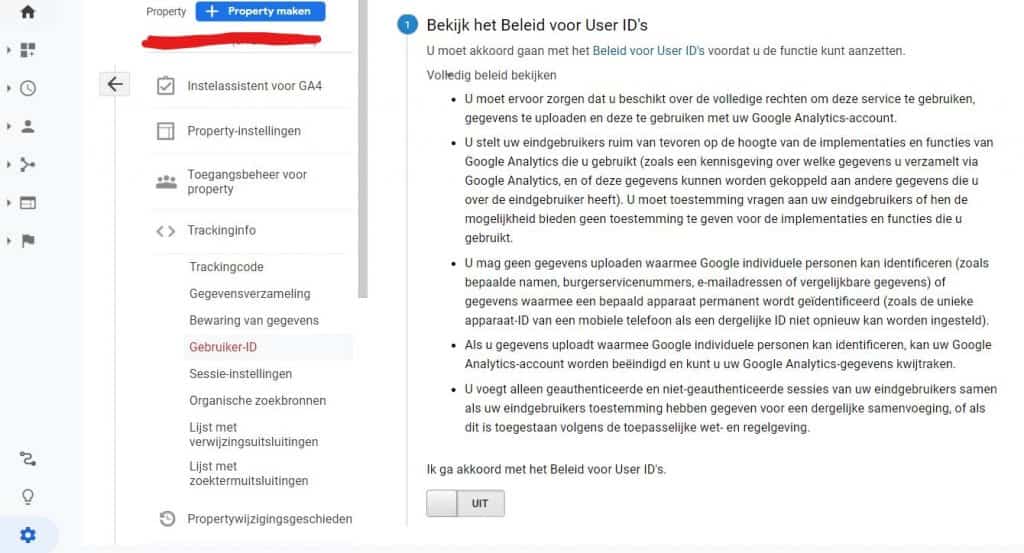
- Do not enable the User ID feature by accident Google lets you link browsing behavior across devices and sessions. That is only allowed if you ask users for consent. So check whether this setting is switched off. Go once more to Property settings, Tracking info and User ID.
- Inform users about the use of Analytics and offer an opt-out You are allowed to process data with analytical cookies without asking for consent. You do have to inform users about it, for example in a privacy policy. State there that you use cookies and that you have followed the steps above to safeguard privacy.Another piece of advice from the Dutch DPA is to offer your users an opt-out: no information is then sent to Google Analytics. You can do that in two ways: add an element to your website to offer the opt-out to users. Or users can install a browser extension for the Chrome browser, but that is not a convenient solution for everyone.
No idea how to do this, or no time for it?
JKC Media will take care of Google Analytics for you.
Rather hand it off? See how we help with SEO and findability in Google and AI.
More articles
- What is Google Analytics 4 (GA4): and other frequently asked questions 29 August 2022
- Google Analytics 4 tips: what not to forget 28 September 2023
- GEO and SEO: what Google finally admits 10 June 2026