
Google Ads cost is not a fixed price. You set the budget, and Google’s auction decides what each click costs. For a small or mid-sized business that turns “what does Google Ads cost?” into a calculation you can do yourself, instead of a price list you have to look up. Below we explain how the auction works, what drives the price per click, how to work out a starting budget from the cost per lead you can afford, what management adds, and why the first weeks are for learning.
How the Google Ads auction sets your price
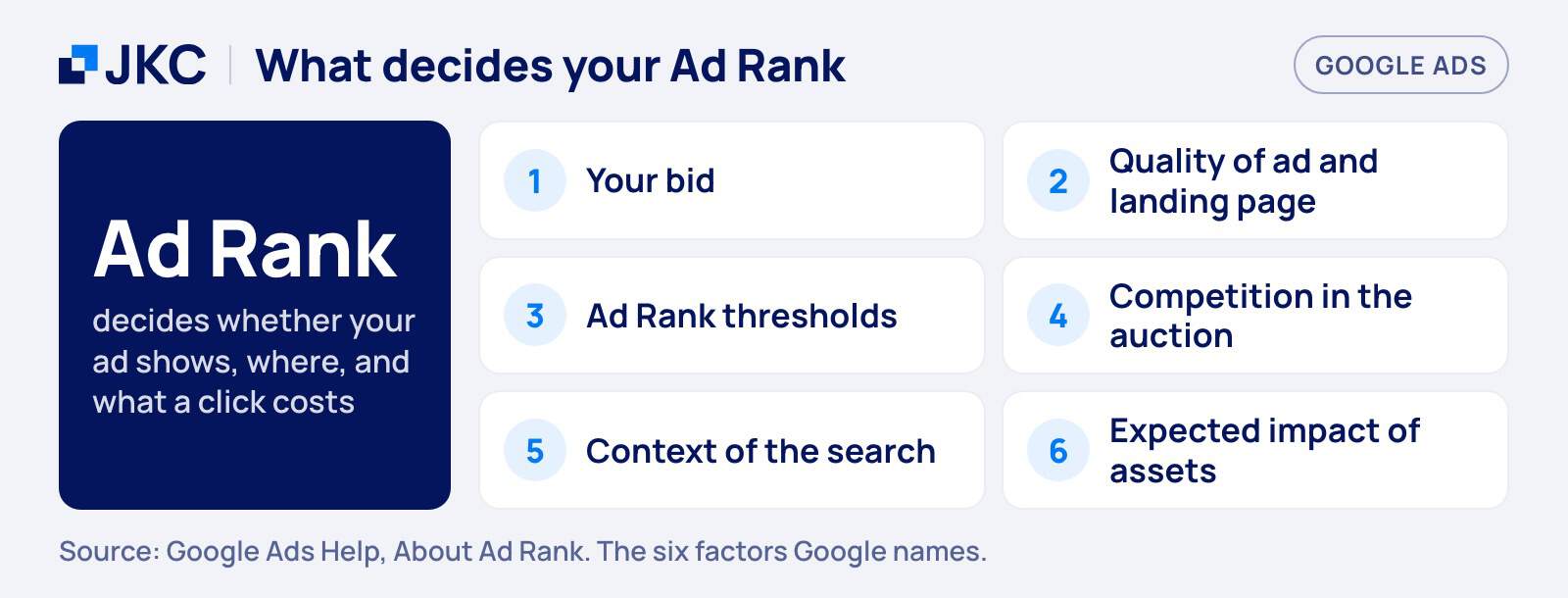
You pay per click, but not a fixed amount. Every time someone searches, Google runs an auction between the advertisers that want to show. The order is decided by Ad Rank, which Google says is based on six factors: your bid, the quality of your ads and landing page, the minimum thresholds an ad must reach, how competitive the auction is, the context of the search and the expected impact of your ad assets. Your bid is the maximum you are willing to pay for a click, not the price you end up paying.
What drives your cost per click
Google writes that as the gap in Ad Rank between two advertisers grows, the higher-ranking ad is more likely to win “but also may pay a higher cost per click”. In practice that means three things push your price up or down: how many advertisers want the same search, how relevant your ad and landing page are to that search, and the context in which the search happens.
For a sense of scale, LocaliQ reports an average CPC of $5.42 for search advertising across all industries in 2026, based on campaigns of thousands of its customers on Google Ads and Microsoft Ads. The page gives no country and the amount is in dollars, so read it as an international indication and not as a Dutch price. Your own keywords can sit far below or above it. The only number that counts is the one in your account after the first weeks.
Quality Score is a diagnostic, not a price lever
Many guides say Quality Score sets what you pay. Google’s own help page is more careful. It rates keywords from 1 to 10 on expected clickthrough rate, ad relevance and landing page experience, and it describes the score like this:
Quality Score is not an input in the ad auction.
Google Ads Help, “About Quality Score for Search campaigns”
Use it to find weak ads and landing pages. The things it points at, a relevant ad and a page that matches the search, are what you improve anyway, and the quality of your ads and landing page is one of the factors in Ad Rank.
How to set a starting budget for Google Ads
The question “what does Google Ads cost?” is easier to answer when you turn it around. Do not start with what you want to spend. Start with what a lead is worth to you, and calculate back.
Calculate back from your cost per lead
You need three numbers: how many leads you want per month, what a click costs, and how many clicks turn into a lead (your conversion rate). Divide 1 by the conversion rate to get the clicks per lead, multiply by the cost per click to get the cost per lead, and multiply by your lead goal to get the monthly ad spend. The numbers below are round and hypothetical. They are an example, not market data.
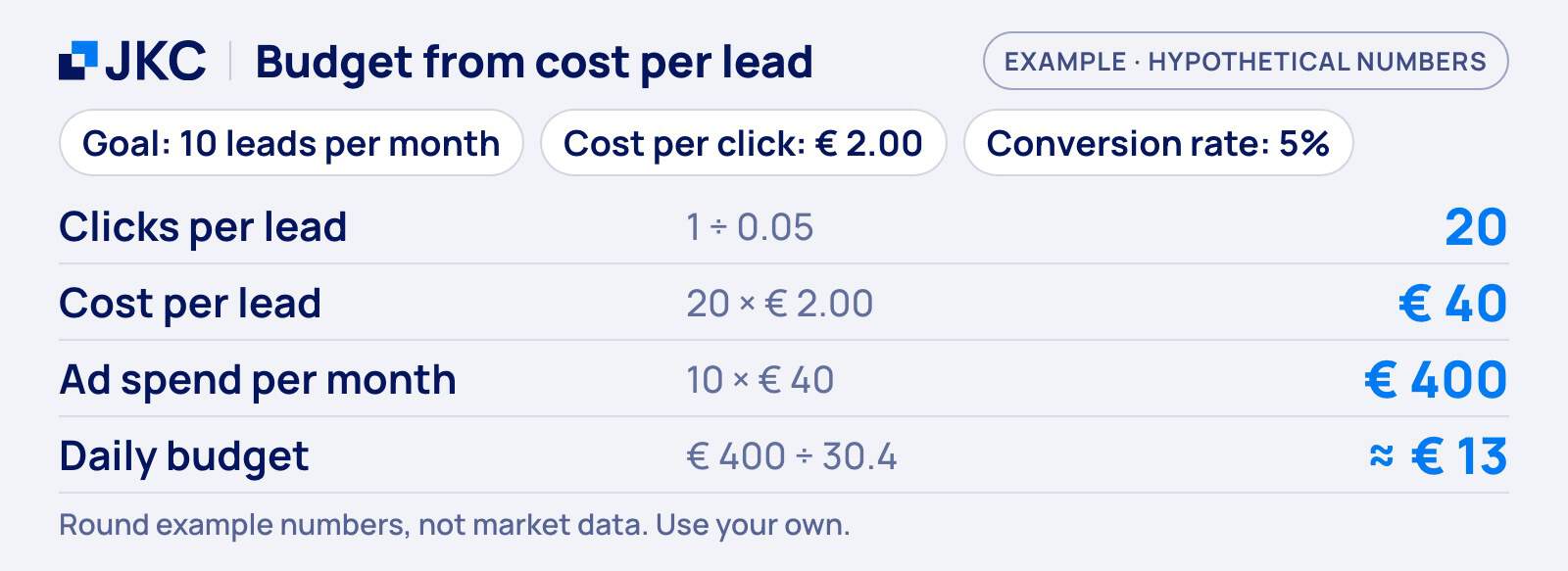
If the cost per lead in your example is higher than what a lead is worth to you, the fix is not a bigger budget. Look at the conversion rate first: a landing page that converts twice as well halves the cost per lead. Our blog on how to measure and improve your conversion rate shows where to start.
How the daily budget behaves
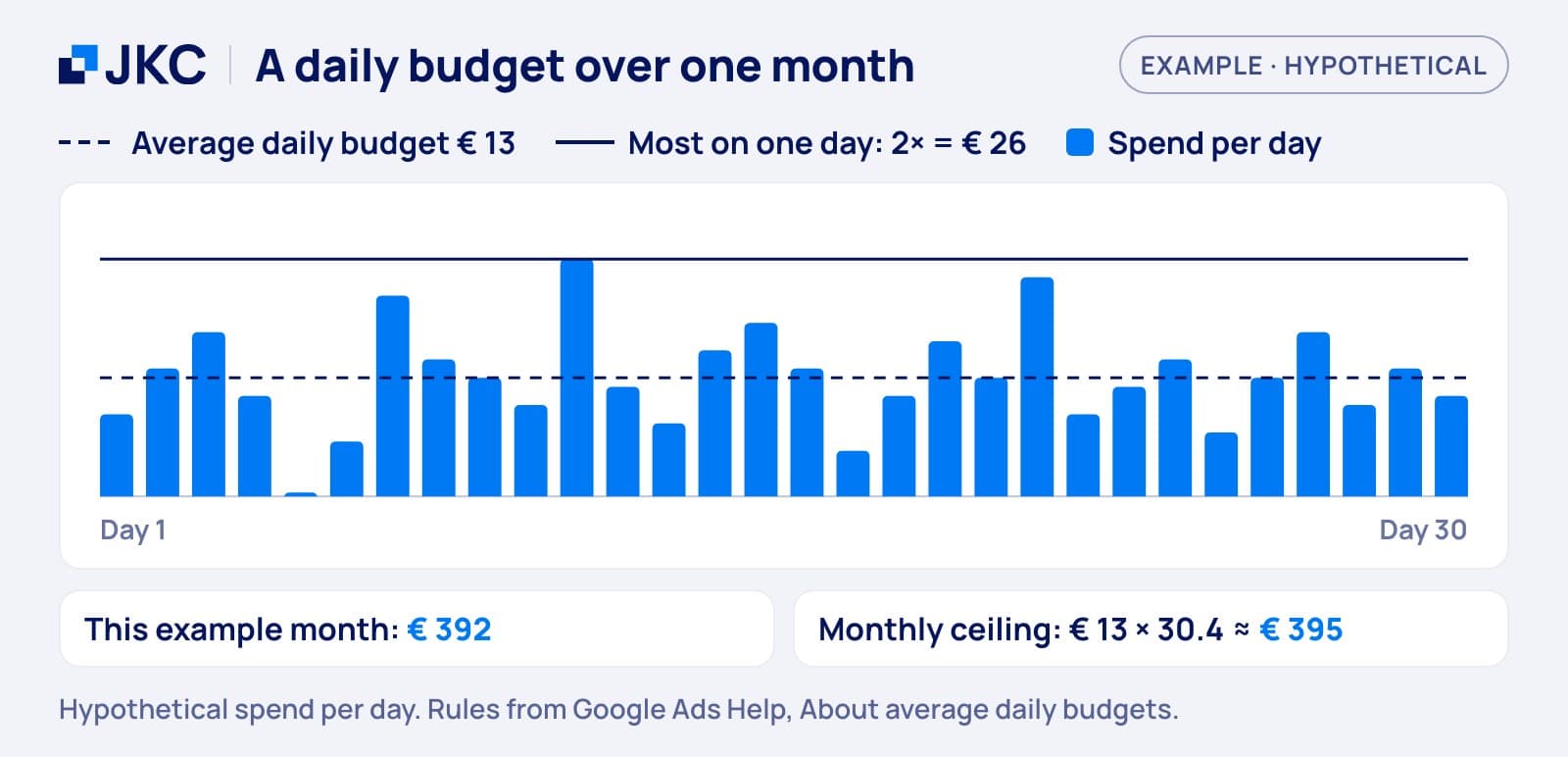
You set an average daily budget per campaign, not a hard limit per day. Google explains that on some days you do not reach it and on others you exceed it, but that you never pay more than two times the average daily budget on one day, and never more than 30.4 times the average daily budget in a month (for most campaigns). In the example, a daily budget of about €13 means a day can cost up to roughly €26, and the month stays at or below roughly €400.
Setting up a Google Ads campaign without wasting the first euros
When you set up a Google Ads campaign, the order matters more than the settings. Set up conversion tracking first, so you can see which clicks turn into inquiries. Then start with a few campaigns on searches where people are ready to buy or ask, and send them to a page that matches the search. Do not start broad. If you are still deciding between ads and organic traffic, our post on SEO and SEA explains what each is good for. Selling products? Then read everything about Google Shopping ads before you plan the budget, because a shopping feed changes the setup.
Performance Max: what it costs and when it fits
Performance Max is the campaign type that most often comes up when budgets are discussed, because it spends across more of Google than search alone.
What Performance Max is
Google describes Performance Max as a goal-based campaign type that gives you access to all Google Ads inventory, including YouTube, Display, Search, Discover, Gmail and Maps, from a single campaign. You provide the assets, such as text, images and videos, and the bidding goal, and you can set a target for cost per action or return on ad spend.
How to budget for it
Google does not give a fixed minimum budget. The budget panel shows a low, medium and high daily suggestion, and Google says the lower level is the minimum recommended budget for your campaign. Because one campaign covers many placements, you hand Google more of the choice of where your money goes. Our advice is to start with a search campaign, where you can see which searches bring leads, and to add Performance Max once conversion tracking is running and you know what a lead costs. Ads inside AI tools are a separate budget question, which we cover in our post on ChatGPT Ads in the Netherlands.
What management and setup add to your Google Ads cost
The ad spend goes to Google. Everything else is time: setting up the account, tracking, ad copy, landing page changes and the weekly work of reading search terms and adjusting. You either pay a specialist for that or you do it yourself.
Agency fee or doing it yourself
Doing it yourself costs no fee, but it costs hours, and the learning phase below is easier to get through when someone has done it before. With an agency you pay a monthly fee on top of the ad spend. Ask whether that fee is a fixed amount or a percentage of your ad spend, because the second grows when your budget grows. This is what the cost items look like for an SME:
| Cost item | What it depends on |
|---|---|
| Clicks | Auction and your CPC |
| Daily budget | Your goal and conversion rate |
| Management | Agency fee or your own hours |
| Tracking and setup | One-off work, then upkeep |
| Website changes | Landing page and checkout |
In the example above, the €400 of ad spend per month goes to Google, and a management fee comes on top of that.
Why the first weeks are a learning phase
Smart bidding strategies need data before they steer well. Google says it can take a few conversion cycles, typically one to two, for a bid strategy to calibrate, and sometimes less when there is more conversion data. A learning period starts when you create or reactivate a strategy, change a setting, or add or remove campaigns, ad groups or keywords. It does not apply to manual CPC.
What that means for your budget
Say a lead takes about two weeks from first click to enquiry (an assumption for this example). One to two conversion cycles then means two to four weeks before the bidding settles. In that time the cost per lead is not the number to judge by. Plan the first month as a test budget, and avoid changing settings every few days, because every change can restart the learning. Fewer leads also means less for the system to learn from, which is one more reason to set the budget from the calculation above and not from the lowest amount you can get away with.
How JKC Media helps with Google Ads
We run Google Ads for businesses, from the account and tracking to the reporting. We do not take a percentage of your ad spend. On our service page the entry is €237.50 per month for managing the ad account, and €475 to €950 per month when we also do the conversion work on your site. We usually advise at least €10 a day in ad spend. All amounts exclude VAT, and the work is always tailored to you. If you want to know where your current spend is leaking, start with our free Growth Scan.
Frequently asked questions: Google Ads cost
How much does Google Ads cost per month?
There is no standard amount, because you set the budget and the auction sets the price per click. The monthly cost is your ad spend plus management if you hire it. Calculate the ad spend from your lead goal, cost per click and conversion rate, then add the fee of whoever runs the account for you.
What is a good starting budget for Google Ads?
A good starting budget is the one you can calculate back from a lead goal: leads wanted times the cost per lead. In our example that is €400 a month, about €13 a day. Do not pick the lowest amount possible, because too few clicks means too little data to learn from.
Can Google spend more than my daily budget?
Yes, on a single day. Google says that for most campaigns you never pay more than two times your average daily budget on one day, and never more than 30.4 times your average daily budget in a month. A day can therefore be expensive while the month stays within your planned amount.
How long before Google Ads works?
Google says a bid strategy typically needs one to two conversion cycles to calibrate, sometimes less with more data. How long that takes depends on how long customers need to decide. Treat the first weeks as a test, avoid constant changes, and judge the cost per lead after the strategy has settled.
Want to know what Google Ads would cost for your business? Take the free Growth Scan and we will show where your budget works hardest. Or get in touch if you would rather talk it through.
More articles
- Everything you need to know about Google Shopping ads 30 January 2025
- Writing blogs: how do I get started? 19 February 2018
- Improving your company’s online identity 30 April 2018