WordPress 7 arrived in two steps this year: WordPress 7.0 on May 20, 2026 and WordPress 7.1 on August 19. If you log in to your website now, the dashboard looks different, there is a new settings page for AI, and the editor can do things that used to require a developer. Below you will find what actually changed, what did not ship despite the headlines, and the five-minute check to do before you click update.
What changed in WordPress 7.0
WordPress 7.0 is codenamed “Armstrong”. The official announcement calls it the foundation for AI across WordPress. For people who manage a website day to day, three things stand out.
A redesigned dashboard and a command palette
The admin area got a new colour palette and smoother transitions. More useful is the command palette: press Ctrl+K (or Cmd+K on a Mac) anywhere in the dashboard and type what you are looking for, such as “new page” or “plugins”. It saves a lot of clicking through menus.
Connectors: one place for AI connections
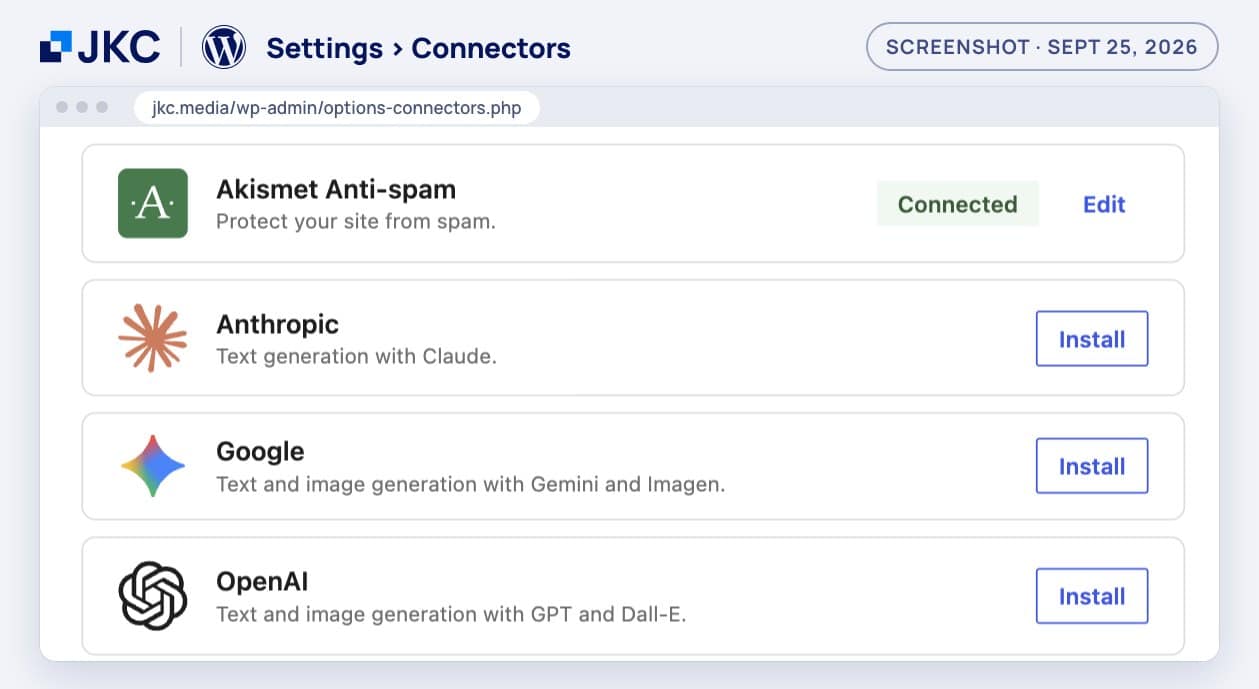
Under Settings you will find a new page called Connectors. This is where you manage links to external services, including AI providers such as Anthropic, Google and OpenAI. Nothing happens by default. A provider only becomes active once you install its connector and add your own API key, and a plugin still has to use that connection. This is what the page looks like on our own website:
Editing without a developer
The editor gained a visual revision browser that shows what changed between two versions of a page, a font library for installing and managing fonts, new Breadcrumbs and Icons blocks, and the option to hide a block on mobile or desktop only. That last one used to require custom code.
What WordPress 7.1 added
WordPress 7.1 “Mary Lou” builds on that. You can now set per screen size how a block looks, directly in the editor and without custom CSS. Cropping, rotating and editing image details happens in a new media editor. And image compression and thumbnails are now generated in the browser, with built-in support for AVIF and for HEIC, the format iPhones use for photos.
| WordPress 7.0 | WordPress 7.1 | |
|---|---|---|
| Release date | May 20, 2026 | August 19, 2026 |
| Codename | Armstrong | Mary Lou |
| Most noticeable | New dashboard, Connectors page | Responsive styles, media editor |
| For editors | Visual revisions, font library | Notes, tabs block, hover styles |
| Behind the scenes | AI client in core, PHP 7.4+ | Image processing in the browser |
Source: release announcements on wordpress.org.
What is not in WordPress 7 yet
Many articles still claim that WordPress 7.0 lets you edit a page together in real time, like in Google Docs. That feature was announced and tested, but it was removed shortly before the release because of concerns about stability and server load. Work on it has resumed, but there is no release date yet. Until then, two people editing the same page at the same time still means one of them has to wait.
What to check before you update to WordPress 7
An update to 7.0 or 7.1 usually goes smoothly. Where it goes wrong, it is almost always a plugin or an outdated server, not WordPress itself. These are the checks we would do first.
1. Your PHP version
WordPress 7.0 no longer runs on PHP 7.2 or 7.3. The minimum is 7.4, but WordPress recommends PHP 8.3 or higher. You can find your version under Tools › Site Health › Info › Server. Below 8.3? Ask your hosting provider to upgrade before you update WordPress, and test your site after that step separately.
2. Plugins marked “Not tested”
Under Dashboard › Updates, WordPress shows for each plugin whether its developer has confirmed it works with your version. On our own site, on September 25, that looked like this:
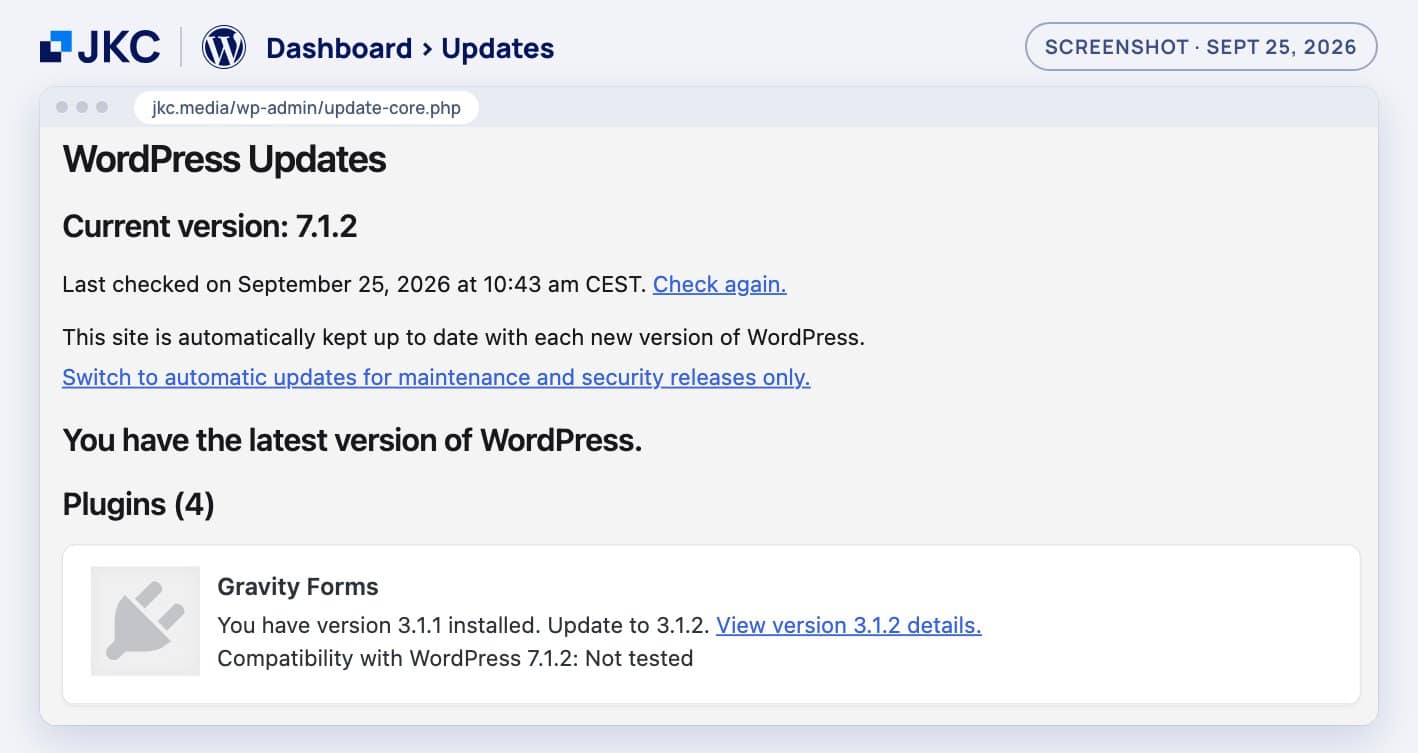
“Not tested” does not mean broken. It means the developer has not yet updated the compatibility label. For plugins that handle forms, payments or bookings, it is still wise to wait for that confirmation or to try the update on a copy of the site first.
3. A backup and a test copy
Make sure there is a recent backup that you can actually restore. If you have a staging environment, run the update there first and click through the pages that matter: the homepage, a contact form, and for a webshop the full checkout up to the payment page.
4. Automatic updates: on or off?
The same screen shows whether WordPress installs major versions by itself. On jkc.media that is switched on. For a simple site with few plugins that is fine; for a webshop or a site with a lot of custom work, it is safer to only automate the maintenance and security releases and to plan the major updates yourself.
How JKC Media handles WordPress updates
Updates, monitoring and the fixes that cannot wait are part of our support and continued development. That way WordPress 7 becomes part of the regular updates we already do, instead of a job you have to plan yourself. Would you rather use the new AI options in WordPress? Our blog on WordPress management with AI shows where it saves time, and we build WordPress websites with these new blocks from the start.
Frequently asked questions about WordPress 7
Is WordPress 7 free?
Yes. WordPress 7.0 and 7.1 are free updates for every self-hosted WordPress site. You install them via Dashboard › Updates. Costs only come in when someone does the testing and fixing for you.
Should I go straight to WordPress 7.1?
Yes, if your plugins support it. There is no need to install 7.0 first; WordPress updates straight to the latest version. On September 25, 2026 that was 7.1.2.
Which PHP version do I need for WordPress 7?
At least PHP 7.4, because support for 7.2 and 7.3 was dropped in 7.0. WordPress recommends PHP 8.3 or higher. You can see your version under Tools › Site Health › Info › Server.
Does WordPress 7 send my content to an AI service?
Not by itself. WordPress 7.0 contains the building blocks for AI, but a provider is only used after you install a connector, add your own API key and use a plugin that relies on it. Without those steps, nothing is sent anywhere.
Can we edit a page together in real time in WordPress 7?
Not yet. Real-time collaboration was removed from WordPress 7.0 shortly before its release and is still being developed. What 7.1 does offer are notes with @mentions, so you can leave feedback for a colleague in the editor.
Check it on your own site now. Log in, open Dashboard › Updates and Tools › Site Health › Info › Server. Do you see a plugin marked “Not tested”, or a PHP version below 8.3? Send us a screenshot of those two screens via our contact page and we will tell you whether you can update safely, or what needs to happen first.
More articles
- WordPress dominates 33.3% of the internet 12 March 2019
- Website development costs, comparisons and tips 17 December 2018
- iDEAL is disappearing: what you need to know 29 August 2024