
When consumers need something, they often search online right away. As a company, you want to be visible there with your products and services. Google Shopping ads make that possible. In this blog you will discover how they work, what the pros and cons are, and how to set them up successfully.
What is Google Shopping?
Advertising through Google is important for many companies. Do you run a webshop? Then advertising through Google Shopping can be interesting for your business, alongside advertising through Google Ads. Google Shopping ads are the product ads you see above the search results. There is also a separate tab called Shopping where you will find more products. For a webshop this is the most important way of advertising: your products are immediately visible, including name, price, image and a short description. Google Shopping runs through the Google Merchant Center. Listing your products there is free; you pay for the product ads at the top of Google.
Buying products online has only kept growing in recent years. In 2024, almost thirteen million Dutch people over the age of twelve bought something online in the previous three months.
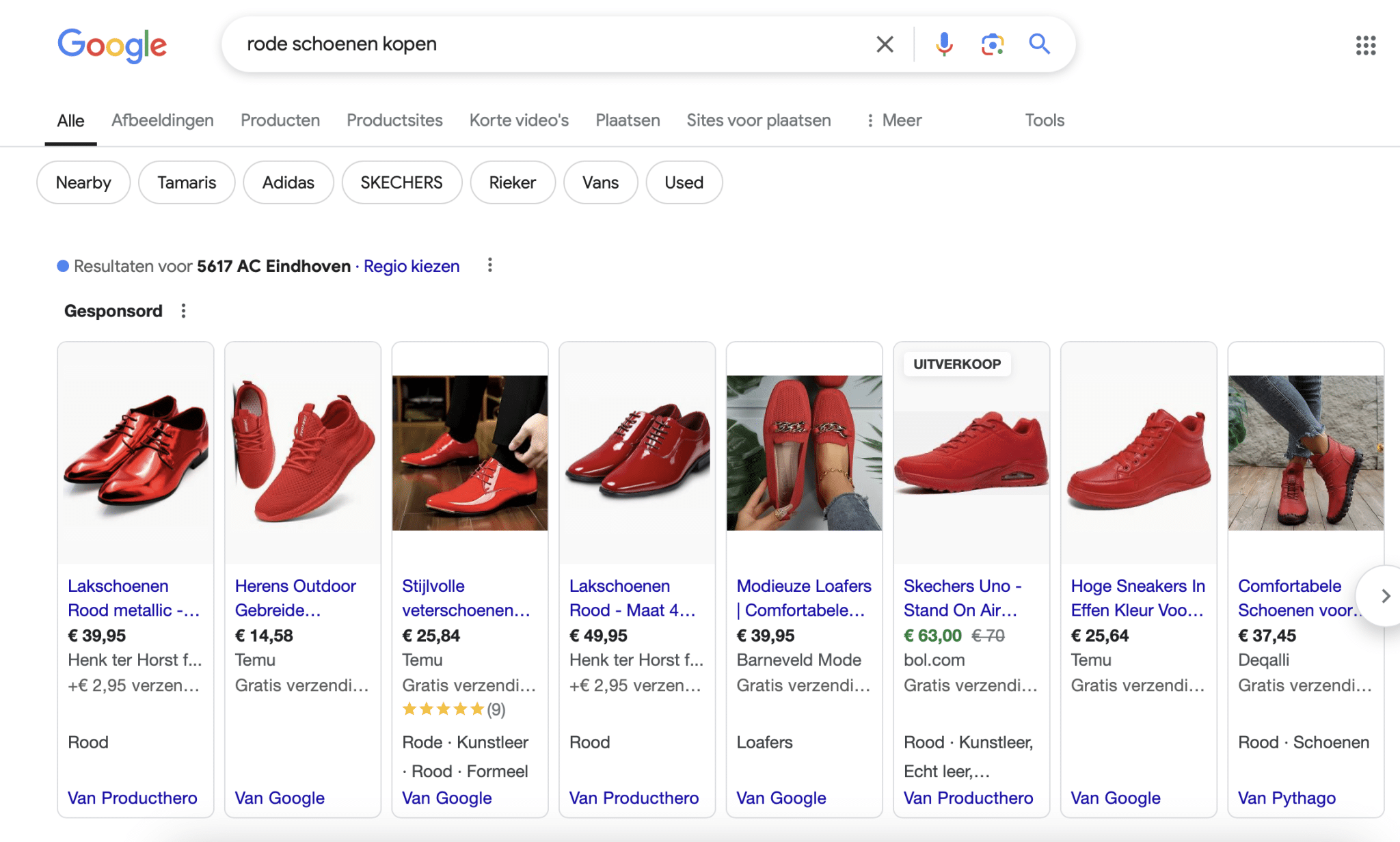
The Google Shopping ads for the search term ‘buy red shoes’
The Google Shopping ads under the ‘Shopping’ tab for the search term ‘buy red shoes’
What do you pay for Google Shopping ads? That depends on several factors. As with Google Ads, you pay per click when you appear among the search results. You set a maximum amount you want to pay yourself, including the bids and the matching strategy. Depending on what you set, your products will or will not be shown. Visibility depends not only on your bid, but also on the quality score of your ad: the better it is, the less you pay.
What are the pros and cons of Google Shopping ads?
Before you get started with Google Shopping ads, you naturally want to know all the pros and cons. Here they are. What are the advantages?
- Your products are immediately visible at the top of the search results when consumers enter a query that is relevant to your product range.
- Because you are at the top, you get more clicks on your products.
- Your product is visible right away. That creates a higher purchase intent, which makes incoming clicks more valuable, since people already know what they are going to buy.
- Signing up for Google Shopping and using it is relatively simple.
- The cost per click, or CPC, is often lower than with text ads, for example.
- You can advertise at product level and set up highly selective, relevant ads.
What are the disadvantages?
- Because far more product ads are shown than text ads through Google Ads, the competition is considerably greater. As a result, the click through rate is often lower.
- Setting up and uploading your products for Google Shopping ads can be a lot of work.
- You cannot add keywords the way you can in Google Ads. Google Shopping uses information from your feed for that.
Setting up Google Shopping: how do you do it?
To set up Google Shopping ads you need the following: a webshop with products, a Google Merchant Center account and a Google Ads account. What are the main steps you have to go through?
- Set up your Google Ads and Google Merchant Center accounts completely.
- Create a campaign, including ads. Make sure your product feed is in order first and that Google Merchant Center is connected to Google Ads.
- Keywords are chosen based on the feed you have uploaded. Almost every platform offers a way to implement this through a plug-in or extension.
- Get your targeting right. Take location, demographics and device type into account.
- Check the auction and the quality score. Choose a bidding strategy and your cost per click.
- Keep optimizing continuously to get the best results. Take a close look at the quality score of your ad, because it partly determines your position in the search results. Also check the data in Google Analytics and the dashboard within Google Shopping itself for more results.
It is important that your webshop is set up properly. Think of clear images and complete product information. You want to include as much relevant information as possible in your product feed.
Set up your ads so that they stand out and grab attention. Think of convincing titles, clear images and enough product information. A few extra tips: set negative keywords too (keywords that are not relevant) so that you are not found on them, advertise on specific products instead of on everything, split this properly into ad sets for different audiences, and use Google Shopping ads for retargeting.
JKC gets to work for you
Are you looking for a partner that thinks along with your marketing and takes the work off your hands? JKC is happy to get to work for you. We are glad to look at how ads can best be used for your company and your audience.
Want to outsource ads such as Google Shopping ads? We think along with your marketing!
Rather hand it off? See how we help with Google Ads and having a webshop built.
More articles
- 5 essential tips to get the most out of your email marketing 4 March 2025
- Social media content calendar for 2025 17 December 2024
- How to write a good RFP for your new website 7 April 2025